Gann Strategy Indicator for XAUUSD H4 – AsliGold Gann Suite Multi-Strategy Indicator on TradingView
W.D. Gann left behind dozens of trading concepts. Time cycles, Square of 9, retracement levels, swing highs, angle projections. Most modern Gann indicators on TradingView pick one of these and call it a day. The problem with that approach is simple – no single Gann method works in every market condition. Some setups dominate during bull regimes, others fire during ranges, and a few catch reversals at structural levels. The AsliGold Gann Suite is built differently. It runs 8 independently validated Gann based setups on XAUUSD H4 simultaneously, each tested across 16 years of data and 1,180 trades, then surfaces them through a single primary dashboard with confluence detection. Here is how the system works, what got included, what got rejected, and how it fits into the broader Asligold indicator toolkit.
AsliGold Gann Suite H4 on a live XAUUSD chart. Primary strategy shows BUY entry triangle, TP/SL/MaxBars exit markers, and live trade lines. Dashboard tracks all 8 setups with filter status, signal panel, and live trade stats.
Contents
- 1. What the Gann Suite Indicator Does
- 2. The Research Process – 605,000 Configurations Tested
- 3. The 8 Validated Setups Inside
- 4. How the 8 Setups Work Together (Interactive)
- 5. Aggregate Stats Across 1,180 Trades
- 6. What You See on Your Chart
- 7. The Live Dashboard – 8-Strategy Tracker with Confluence Detection
- 8. How to Trade This System Step by Step
- 9. Alert Setup – 17 Conditions Including Confluence
- 10. Where This Fits in the Asligold Toolkit
- 11. How to Get Access
- 12. FAQ: 7 Questions About Gann Strategy Trading on Gold
1. What the Gann Suite Indicator Does
The Gann Suite is a multi-strategy signal monitor that watches XAUUSD H4 for setups across 5 different Gann methodologies simultaneously – Time Cycles, Square of 9 breaks, Square of 9 bounces, Retracement breaks, and Swing structure breaks. Each method is implemented as a fully independent setup with its own filters, stop loss multiplier, take profit target, and maximum hold duration.
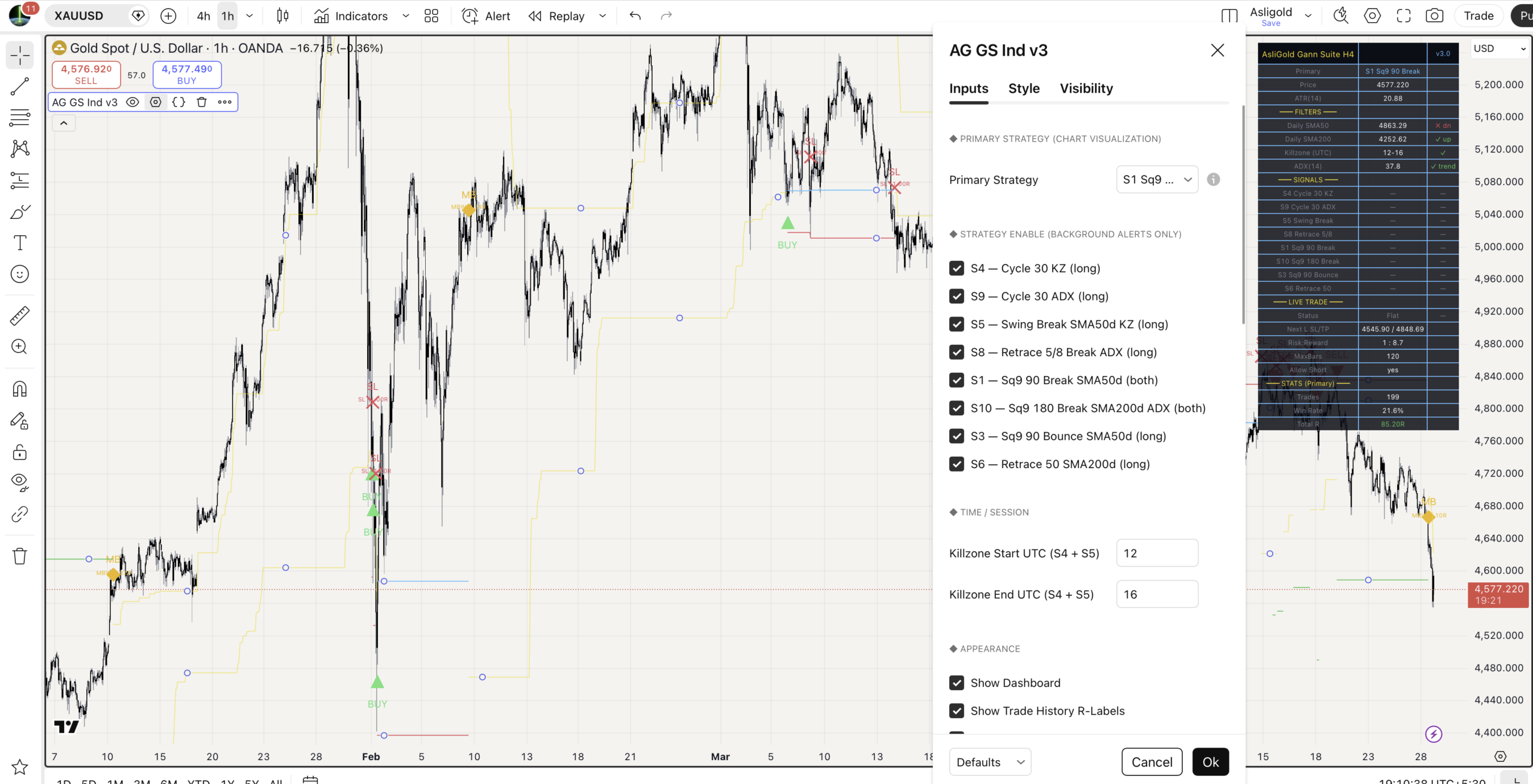
You select one setup as your primary. That setup gets full chart visualization with BUY/SELL entry triangles, TP/SL/MaxBars exit markers, R-multiple labels for every closed trade, and live entry/SL/TP lines while a trade is open. The other 7 setups run silently in the background and feed into the dashboard plus their own alert conditions.
2. The Research Process – 605,000 Configurations Tested
This is not a tool built on theory. The Gann Suite is the surviving subset of an exhaustive quantitative search across 13 different Gann methodologies on 16 years of OANDA XAUUSD H4 data.
The pipeline ran every viable parameter combination through 5 stages of validation:
Stage 1 – Brute force backtest: 605,070 configurations tested. Anything with profit factor below 1.1 or Sharpe below 0.5 was discarded immediately.
Stage 2 – Quality cull: Survivors filtered for minimum 80 trades, profit factor above 1.4, drawdown under 20 percent, and Sharpe above 1.2. This dropped the pool to roughly 44,000 candidates.
Stage 3 – Era stability: Each candidate had to remain profitable across at least 3 of 4 distinct gold market regimes – the Bull market 2006 to 2011, the Bear 2011 to 2016, the Range 2016 to 2020, and the Mega Bull 2020 onward. This catches setups that only work in one type of environment.
Stage 4 – Walk forward and bootstrap: Time series cross validation using 4 sequential 25 percent folds, plus 300 bootstrap resamples to verify the lower 5 percent percentile of profit factor stayed above 1.05.
Stage 5 – Decorrelation: A greedy decorrelation pick selected 10 final setups whose trade signals had low pairwise correlation – meaning each one captures genuinely different market behavior.
Of those 10, 8 were verified on TradingView with results matching Python projections within acceptable execution haircut. The remaining 2 were dropped – one short only cycle reversal that proved unreliable on TV, and one with insufficient trade count to publish confidently. Those 8 verified setups are what is in the Gann Suite.
3. The 8 Validated Setups Inside
Each setup uses a different Gann concept and fires under different conditions. Here is what each one does.
| ID | Setup | Method | Filter | Direction |
|---|---|---|---|---|
| S4 | Cycle 30 Killzone | Time Cycle 30 bar | London-NY Killzone (12-16 UTC) | Long |
| S9 | Cycle 30 ADX | Time Cycle 30 bar (tight) | ADX greater than 20 | Long |
| S5 | Swing Break | 5-bar pivot break | Daily SMA50 + Killzone | Long |
| S8 | Retrace 5/8 | 62.5 percent range break | ADX greater than 20 | Long |
| S1 | Sq9 90 Break (Top PF) | Square of 9 / 90 degree break | Daily SMA50 | Both |
| S10 | Sq9 180 Break | Square of 9 / 180 degree break | Daily SMA200 + ADX | Both |
| S3 | Sq9 90 Bounce | Square of 9 support rejection | Daily SMA50 | Long |
| S6 | Retrace 50 | 50 percent midpoint break | Daily SMA200 | Long |
Two Square of 9 setups (S1 and S10) are bidirectional – they take long signals when price breaks above a projected resistance level and short signals when price breaks below a projected support level. The remaining 6 setups are long only because backtest research consistently showed reversal-style shorts on Gold do not survive live execution. Only objective level breaks (Square of 9 support breaking) provide reliable short signals.
4. How the 8 Setups Work Together (Interactive)
Every closed XAUUSD H4 candle runs through the same pipeline. The macro filters check first, then all 8 setups evaluate in parallel. Click any setup card below to expand its trigger logic, filter conditions, trade levels, and 16-year backtest stats.
How the 8 Gann setups work together
Click any setup below to expand its trigger logic, filters, and 16-year backtest stats
5. Aggregate Stats Across 1,180 Trades
Here is what 16 years of testing produced across all 8 setups.
| Setup | Profit Factor | Net Return | Max Drawdown | Trade Count |
|---|---|---|---|---|
| S3 Sq9 90 Bounce | 2.34 | +48% | 7.2% | 85 |
| S1 Sq9 90 Break | 2.29 | +91% | 7.9% | 137 |
| S9 Cycle 30 ADX | 1.85 | +92% | 7.8% | 215 |
| S10 Sq9 180 Break | 1.83 | +44% | 6.2% | 114 |
| S4 Cycle 30 KZ | 1.82 | +103% | 6.2% | 235 |
| S6 Retrace 50 | 1.77 | +12% | 2.9% | 64 |
| S5 Swing Break | 1.70 | +35% | 3.9% | 139 |
| S8 Retrace 5/8 | 1.56 | +56% | 7.4% | 191 |
Across all 8 setups: 1,180 trades, average profit factor 1.90, all 8 closed profitable across the test period.
The two highest profit factors come from Square of 9 setups (S3 and S1), both above 2.29. The smoothest equity curve belongs to S6 Retrace 50 with only 2.9 percent maximum drawdown and a 56 percent win rate – this one trades fewer times and aims for smaller targets, but produces the most stable returns. The biggest sample size is S4 Cycle 30 with 235 trades, giving the highest statistical confidence.
6. What You See on Your Chart
The chart shows full visualization for the primary strategy you selected. The other 7 setups run in the background and only surface in the dashboard plus alerts.
| Element | Style | Meaning |
|---|---|---|
| BUY triangle | Green up triangle below bar | Primary fresh long entry signal. |
| SELL triangle | Red down triangle above bar | Primary fresh short entry (S1/S10 only). |
| TP marker | Green down triangle above bar | Take profit hit. Trade closed in profit. |
| SL marker | Red X cross above bar | Stop loss hit. Trade closed at loss. |
| MB marker | Amber or gray diamond | MaxBars exit. Amber if profitable, gray if losing. |
| R-multiple label | Floating text near each exit | Permanent label showing exact R outcome (e.g. TP +8.67R). |
| Cyan line | Cyan | Entry price. Active during open trades. |
| Red line | Red | Stop loss level. Active during open trades. |
| Green line | Green | Take profit level. Active during open trades. |
| Reference lines | Gold | Method aware. Sq9 levels for Sq9 setups, retracement levels for range setups, swing high for swing setups. |
The reference lines auto-adapt based on which primary strategy you have selected. If you switch primary from S1 to S5, the chart automatically swaps Square of 9 lines for swing high lines.
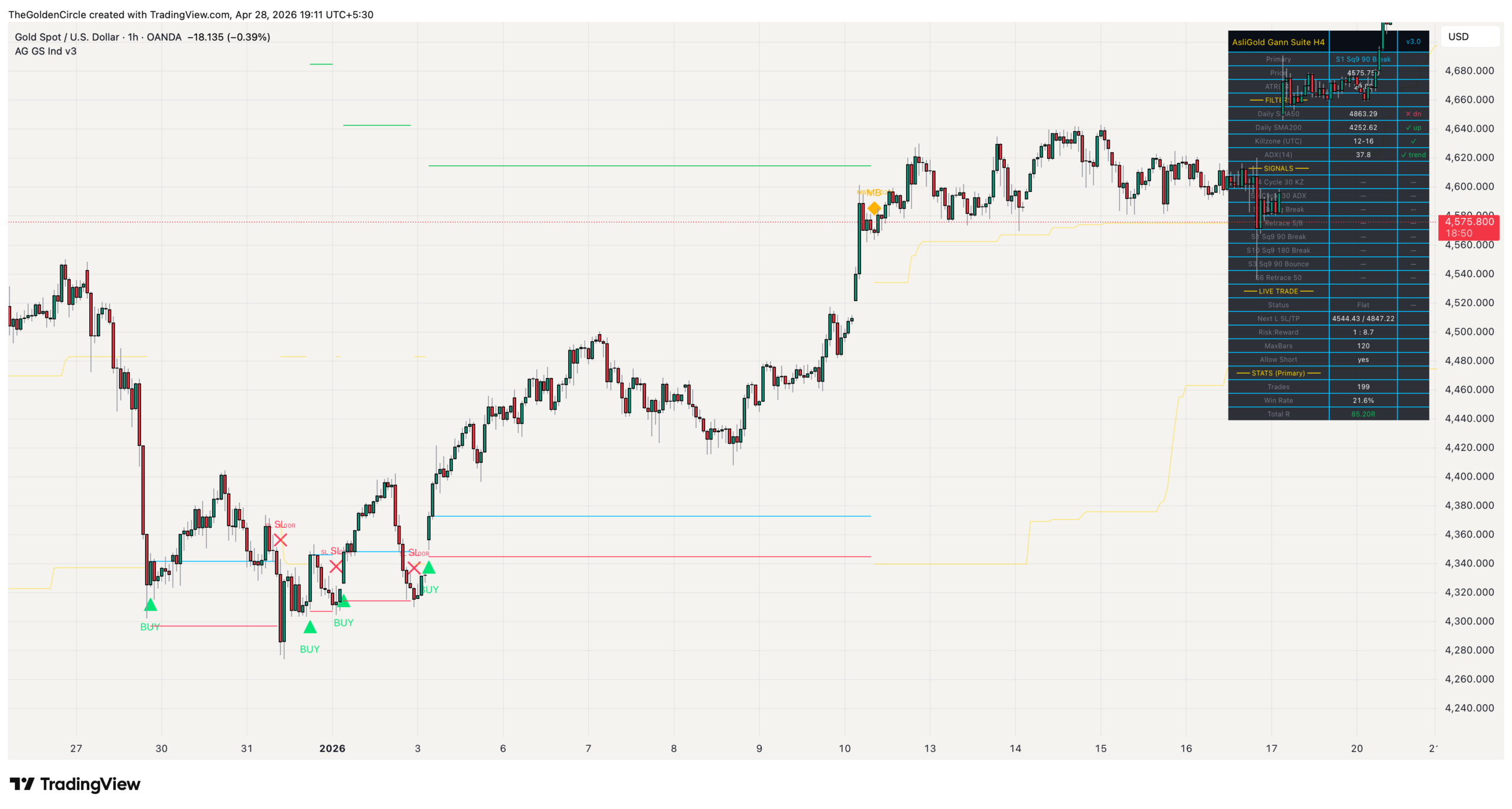
All chart elements: BUY entry triangle, TP/SL/MaxBars exit markers with R-multiple labels, live entry/SL/TP lines during active trades, and method-aware Square of 9 reference levels in gold.
7. The Live Dashboard – 8-Strategy Tracker with Confluence Detection
The dashboard shows everything happening across all 8 setups at a glance.
| Field | What It Shows |
|---|---|
| Primary | Currently selected primary strategy name. |
| Price / ATR(14) | Current XAUUSD close and 14-period ATR. |
| Daily SMA50 | Live SMA50 value with up/down status against price. |
| Daily SMA200 | Live SMA200 value with up/down status. Strict trend filter check. |
| Killzone (UTC) | Active or inactive. Whether current bar is inside 12-16 UTC. |
| ADX(14) | Current ADX value with trending or choppy classification. |
| S4 to S6 rows | Each of the 8 setups shown individually with current signal state (LONG, SHORT, or no signal) and active/off status. |
| Live Trade panel | When primary is in a trade: status, entry, SL/TP, current R-multiple, bars held. When flat: next SL/TP levels, R:R ratio, MaxBars, and direction permission. |
| Stats (Primary) | Trade count, win rate percentage, total R, average R per trade for the primary strategy simulation. |
The signals row for each setup is the most important live information. When 2 or more setups show LONG simultaneously, that is confluence. Confluence trades historically produce significantly higher win rates than single-setup signals because multiple independent methods agree on the same direction.
8. How to Trade This System Step by Step
Step 1: Apply the indicator to OANDA:XAUUSD on H4. Default settings are calibrated for this symbol and timeframe.
Step 2: Pick your primary strategy from the dropdown. If you are new to the system, start with S5 Swing Break or S6 Retrace 50 – these have the lowest drawdowns and highest win rates. As you build confidence, you can switch to higher PF setups like S1 or S3.
Step 3: Check the dashboard for environment. Look at the filters block. SMA50 up, SMA200 up, ADX trending – this is the regime where most setups thrive. If filters are misaligned, expect fewer signals.
Step 4: Wait for the BUY entry triangle on the primary. When the primary fires, the indicator simulates a virtual trade with full SL/TP/MaxBars markers. The R-multiple label appears at trade close so you can see exactly how each historical trade performed.
Step 5: Watch for confluence in the dashboard signals block. If your primary fires a BUY and 1 or 2 other setups also show LONG on the same bar, that is a high-conviction confluence trade. These are the setups worth real position sizing.
Step 6: Manage the trade manually on your broker. The indicator does not place trades – it shows you what should happen. Use the SL/TP levels displayed on screen to set up the trade in OANDA or whichever broker you use.
9. Alert Setup – 17 Conditions Including Confluence
The indicator publishes 17 different alert conditions. Right click on the chart, choose Add Alert, and select AG GS Ind v3 from the dropdown.
| Alert Type | Conditions Available |
|---|---|
| Per-setup signals | 10 individual alerts (S4, S9, S5, S8, S3, S6 long, plus S1/S10 long and short) |
| Aggregate | ANY LONG signal, ANY SHORT signal |
| Confluence | LONG Confluence (2+ setups firing same bar), SHORT Confluence (2+ short setups) |
| Primary lifecycle | Primary BUY, Primary SELL, Primary TP Hit, Primary SL Hit, Primary MaxBars exit |
The Confluence alerts are the most valuable for high-conviction trading. Single-setup alerts catch every signal but include lower-probability ones. The Confluence alert only fires when 2 or more independent setups agree on direction at the same time – statistically the highest quality moments the system can identify.
For automation through webhooks, TradingView requires the Essential plan or higher and 2-factor authentication enabled on the account. The webhook URL field accepts JSON payloads that integrate with services like 3Commas, Tickerly, Autoview, or custom Telegram bots through Make.com.
10. Where This Fits in the Asligold Toolkit
The Gann Suite covers a unique slot – multi-strategy Gann methodology on H4. Here is how it relates to the rest of the toolkit:
| Tool | What It Does | Timeframe |
|---|---|---|
| Gann Suite (this) | 8 Gann based setups with confluence detection | H4 |
| Momentum Edge v9 | Broader momentum continuation with structural stops | H4 / Daily |
| Momentum Pullback H1 | Buys dips within confirmed trends | H1 |
| Mean Reversion H1 | Catches tops and bottoms at Z-Score extremes | H1 |
| 1M Scalper | Precision 1-minute entry timing | 1M |
| Stat Arb Engine | Cross-asset correlation context (Gold vs DXY) | Any |
See all tools: Asligold TradingView Indicators – Complete Gold Trading Toolkit
11. How to Get Access
The Gann Suite Indicator is published openly on TradingView. No invitation needed.
Open on TradingView
Join Telegram
Free to apply. Source code is protected to prevent unauthorized cloning.
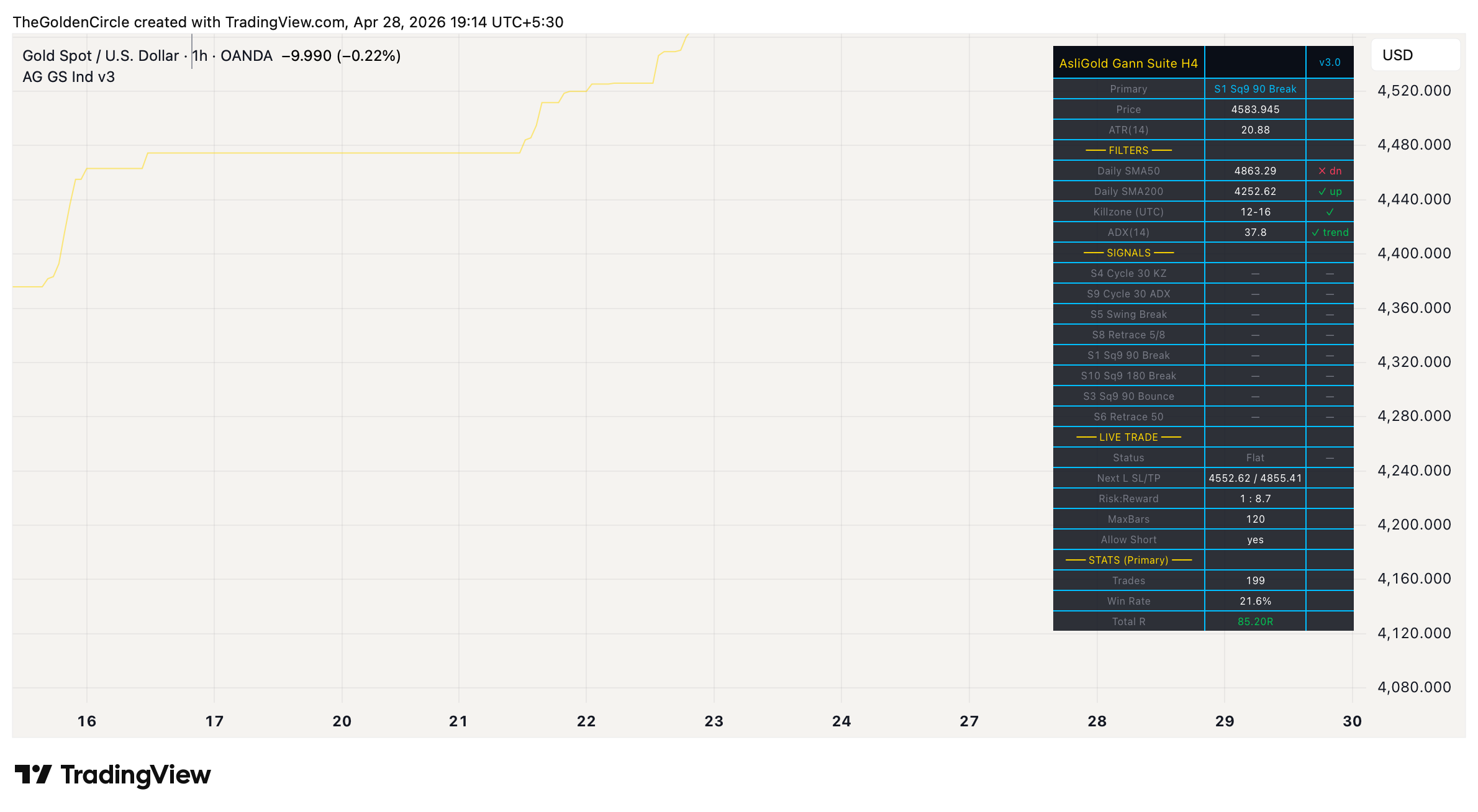
Live dashboard showing filter status, all 8 strategy signal panel, current trade tracker, and primary strategy running stats. Confluence is detected when 2 or more setups show LONG on the same bar.
12. FAQ: 7 Questions About Gann Strategy Trading on Gold
No single Gann method works in every market condition. Time cycles dominate during trending phases but produce false signals in ranges. Square of 9 breaks catch fresh momentum but miss reversals at structural support. Combining multiple independent methods means at least one is usually firing when a real opportunity exists, and confluence between them produces statistically higher quality signals than any single setup alone. The 8 setups have low pairwise correlation by design – they catch genuinely different market behavior.
Backtest research repeatedly showed that reversal style shorts on Gold do not survive live execution. The Time Cycle 30 short variant (originally tested as a 9th setup) had a profit factor of 0.94 in TradingView – net negative. The reason is structural – Gold has a long-term upward bias, and timing-based short reversals get crushed during sustained bull phases. The only short setups that worked are the Square of 9 break-down trades (S1 short and S10 short), where the short is triggered by an objective price level breaking, not a subjective timing signal. These passed validation with profit factors above 1.7.
The Square of 9 is W.D. Gann’s circular numerology for projecting price levels. Take the square root of an anchor price (recent high or low), add or subtract a fraction of 360 degrees converted to radians, then square the result back to get a projected support or resistance level. For example, anchor low of 1000 with a 90 degree projection becomes (sqrt(1000) + 90/180)^2 which equals approximately 1031.81. The system uses these projected levels as objective entry triggers – either when price breaks through them with momentum, or when price tests them and rejects.
Showing 8 sets of BUY/TP/SL markers and entry/SL/TP lines on one chart simultaneously creates visual chaos. The dashboard solution is cleaner – the primary strategy gets the full chart treatment so you can see complete trade lifecycles with R-multiples, while the other 7 setups surface as live signals in the dashboard plus their own alerts. To see all 8 visually, apply the indicator multiple times to the same chart with different primaries selected.
Confluence is when 2 or more independent setups fire the same direction on the same bar. The 8 setups in this suite use different methods (cycles, levels, swings, ranges) and different filters (killzone, ADX, SMA50, SMA200). When 2 of them agree at the exact same moment, that is independent confirmation – the equivalent of 2 different traders using different methods both deciding to buy at the same time. Confluence trades historically produce significantly higher win rates than single-setup signals. The dedicated Confluence alert fires only on these moments.
The Momentum Edge v9 uses a single proprietary multi-bar momentum continuation model with structural stops, optimized over 28 strategy variants. The Gann Suite uses 8 different Gann based methods running in parallel with confluence detection. Both operate on H4 but capture different aspects of the market. Momentum Edge focuses on continuation moves with one validated method. Gann Suite covers a broader range of setup types – cycles, breakouts, bounces, retracements, swings – and surfaces them through one tool. They can be run simultaneously on separate charts since their signals are uncorrelated.
No. Every signal uses confirmed bar data. The barstate.isconfirmed gate ensures signals only fire on closed bars. Daily SMA values use the [1] shift on request.security to access only previous day data, eliminating any forward-looking bias. The trade simulation uses pessimistic exit ordering (SL checked before TP on same-bar conflicts) which slightly underestimates real performance rather than overestimating. The signals you see on historical bars are the same signals that fired in real time.
Read next
Gold Mean Reversion Indicator [H1] – Catch Tops and Bottoms
Gold 1-Minute Scalping Indicator – Precision Entries
Gold Momentum Edge v9 – H4/Daily Trend Following
Gold Pullback Trading Strategy – Buy Dips on H1
Asligold TradingView Indicators – Complete Toolkit
Gold Price Prediction – Weekly XAUUSD Analysis
Have a question about the indicator or membership?
Risk Disclaimer: Trading Gold (XAUUSD) and other financial instruments carries substantial risk. Past performance does not guarantee future results. The AsliGold Gann Suite indicator is for educational and informational purposes only – not financial advice. Backtest results are based on historical data and assume idealized execution. Real trading involves spread, slippage, and broker-specific quirks that reduce performance. Always use proper position sizing and risk management. Never risk more than you can afford to lose. The final trading decision is always yours. This website contains affiliate links – see full disclaimer.