Gold Keltner Channel Breakout Strategy for XAUUSD H4 AsliGold Momentum Pro v2 Indicator and Strategy on TradingView
Gold doesn’t break out randomly. When it does break out, you want to be on the right side of it with your entry, stop, and target already plotted on your chart. The AsliGold H4 Momentum Pro v2 system uses a Keltner Channel upper breakout combined with an EMA50/EMA200 regime gate to identify exactly when Gold is entering a fresh momentum move on the H4 timeframe. The indicator version gives you live signals with price levels and alerts. The strategy version lets you backtest the exact same logic in TradingView’s Strategy Tester. Here’s how the system works, why it uses Keltner Channels instead of Bollinger Bands, and how it fits into the broader Asligold indicator toolkit.
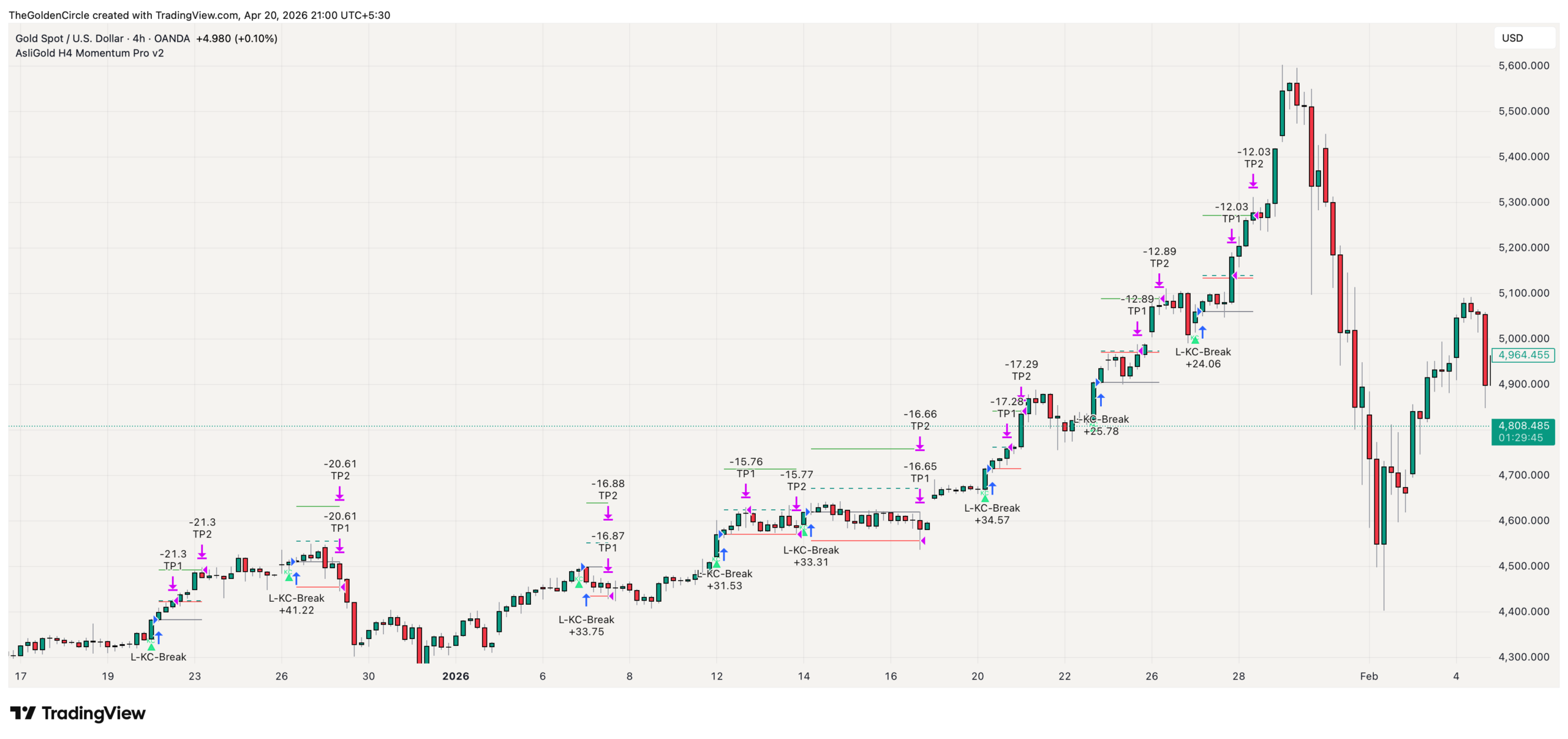
AsliGold H4 Momentum Pro v2 on a live XAUUSD chart. Entry triggers on a fresh Keltner upper band break when the regime gate confirms bullish structure. SL (red), TP1 (teal), and TP2 (green) levels plotted automatically with floating price labels.
Contents
- 1. What the H4 Momentum Pro System Does
- 2. Indicator vs Strategy – Two Scripts, One Logic
- 3. Why Keltner Channel Breakouts Work on Gold H4
- 4. The EMA Regime Gate – How It Filters Bad Breakouts
- 5. The Decision Pipeline (Interactive)
- 6. What You See on Your Chart
- 7. The Live Dashboard – Regime Status and Distance to Breakout
- 8. How to Trade This System Step by Step
- 9. Where This Fits in the Asligold Toolkit
- 10. How to Get Access and Set Up Alerts
- 11. FAQ: 6 Questions About Keltner Channel Breakout Trading on Gold
1. What the H4 Momentum Pro System Does
The system identifies fresh breakouts above the Keltner Channel upper band on the H4 timeframe, but only when Gold’s macro trend structure confirms a bullish environment. This combination – breakout event plus trend confirmation – filters out the false breakouts that destroy most channel-based strategies.
The Keltner Channel uses an EMA25 centre line with bands set at 2.0 times the 14-period ATR. When price closes above the upper band for the first time (a fresh cross, not a continued hold above), the system checks the regime gate. If close is above EMA50, and EMA50 is above EMA200, the regime is confirmed bullish and the entry triggers. If the regime gate fails, the breakout is logged as a blocked signal but no entry is taken.
2. Indicator vs Strategy – Two Scripts, One Logic
Like the Momentum Pullback H1 pair, this system comes as two scripts:
View Indicator on TradingView
View Strategy on TradingView
Same logic, same filters. The indicator shows you what’s happening now. The strategy shows you what happened historically. Always validate with the strategy before trading live with the indicator.
3. Why Keltner Channel Breakouts Work on Gold H4
Most traders are familiar with Bollinger Bands for breakout trading. The H4 Momentum Pro uses Keltner Channels instead, and the reason matters.
Bollinger Bands use standard deviation to set band width. During low-volatility squeezes, the bands contract dramatically and then expand on the breakout. The problem? Standard deviation is heavily influenced by outlier bars. One spike candle can distort the entire band calculation, creating false breakout signals.
Keltner Channels use ATR (Average True Range) instead. ATR measures the average range of each bar over 14 periods – it’s smoother and less sensitive to single-bar spikes. This means the Keltner upper band represents a more stable measure of “how far is too far for this level of volatility.” When price closes above it, the breakout is more likely to be genuine rather than a noise-driven spike.
The “fresh cross only” rule is equally important. The system only triggers on the bar where price first crosses above the Keltner upper band. If price has been sitting above the band for several bars already, it doesn’t trigger again. This prevents entering momentum moves that are already extended rather than fresh.
4. The EMA Regime Gate – How It Filters Bad Breakouts
The breakout signal alone isn’t enough. The regime gate is what separates this from a basic Keltner Channel indicator.
The gate requires: close > EMA50 > EMA200
This means three things must be true simultaneously. Price must be above the 50-period EMA (medium-term trend is bullish). The 50 EMA must be above the 200 EMA (long-term trend structure is bullish, no death cross). And the current close must be above both (price is in the right position within the trend).
During bear markets or choppy sideways phases, this gate blocks entries. When EMA50 drops below EMA200, the regime is invalid and every breakout signal gets rejected. You’ll see this on the chart as the regime background tint disappearing and on the dashboard as “Regime: Inactive.”
This is the same philosophy behind the trend structure gate in the Gold Momentum Edge v9 – different implementation, same principle. The best breakout in the world is worthless if the macro trend doesn’t support it.
5. The Decision Pipeline (Interactive)
Every closed XAUUSD H4 candle runs through the same 4-stage decision pipeline. Click any stage below to expand its exact logic, what it checks, and what happens when it passes or fails.
The 4-stage decision pipeline
Click any stage to see exactly what it checks and how it gates the next step
6. What You See on Your Chart
The indicator is designed for clarity. Minimal visual elements, maximum information.
| Element | Colour | Meaning |
|---|---|---|
| “KC” label below bar | – | Fresh Keltner upper breakout with valid regime. Entry signal. |
| Triangle plot shape | – | Visual marker below signal bars for quick scanning. |
| Gray line | Gray | Entry price level with floating text label. |
| Red line | Red | Initial stop loss level with price label. |
| Dashed teal line | Teal | TP1 – first take profit target. |
| Green line | Green | TP2 – second take profit target (extended). |
| Green background tint | Green | Regime is active (close > EMA50 > EMA200). Optional, toggleable. |
Every entry and exit shows the exact price as small floating text at the right edge of the line. Active trades show live SL/TP/Entry labels that update in real time. Label size is adjustable in settings.
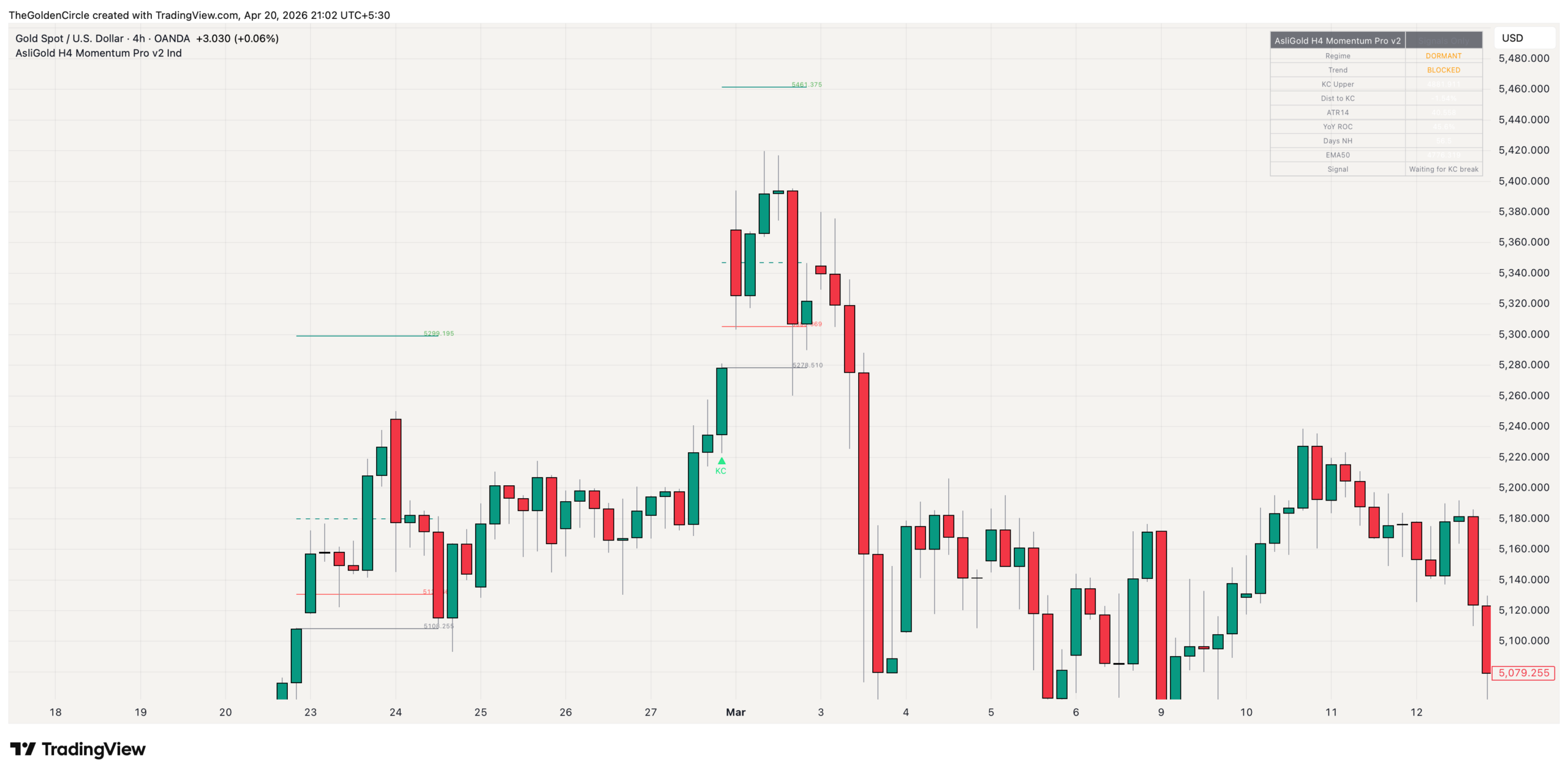
All chart elements: KC entry label, entry price (gray), stop loss (red), TP1 (dashed teal), TP2 (green), and the optional regime background tint showing when the EMA gate is active.
7. The Live Dashboard – Regime Status and Distance to Breakout
The indicator includes a compact dashboard in the corner of your chart that shows everything you need at a glance:
| Field | What It Shows |
|---|---|
| Regime | Active or Inactive. Is close > EMA50 > EMA200? |
| Trend | Current trend state based on EMA alignment. |
| Keltner Upper | The exact price level of the current upper band. |
| Dist to Breakout | How far price is from the upper band as a percentage. Tells you how close a signal is. |
| ATR | Current 14-period ATR value. Shows current Gold volatility. |
| YoY ROC | Year-over-year rate of change. Macro momentum context. |
| Days Since High | How many bars since the last new high. Tracks trend freshness. |
| Signal State | Whether a signal is currently active, waiting, or blocked. |
The “Distance to Breakout” field is particularly useful for anticipation. When it drops below 0.5%, you know a Keltner break is imminent on the next strong bar. You can prepare your position sizing and be ready when the KC label appears.
8. How to Trade This System Step by Step
Step 1: Apply the indicator to XAUUSD H4. Default settings are optimized. No changes needed to start.
Step 2: Check the dashboard for regime status. If Regime shows “Inactive,” there are no valid setups right now. Wait for the regime to activate (close > EMA50 > EMA200). The green background tint will appear when it does.
Step 3: Watch the “Distance to Breakout” percentage. As Gold pushes toward the Keltner upper band, this number shrinks. Below 1% means a breakout attempt is close.
Step 4: Wait for the KC entry label. When price closes above the Keltner upper band for the first time (fresh cross), the KC label appears with the entry, SL, TP1, and TP2 levels all plotted automatically.
Step 5: Enter the trade and manage. Your stop is set. Your targets are set. The levels update in real time. If you’ve validated the system with the strategy version first, you know the historical expectancy of this setup.
9. Where This Fits in the Asligold Toolkit
The H4 Momentum Pro complements the other tools by targeting a specific setup type – Keltner breakouts on H4 during bull regimes. Here’s how it relates to the rest:
| Tool | What It Does | Timeframe |
|---|---|---|
| H4 Momentum Pro (this) | Catches fresh Keltner Channel breakouts in bull regimes | H4 |
| Momentum Edge v9 | Broader momentum continuation with structural stops | H4 / Daily |
| Momentum Pullback H1 | Buys dips within confirmed trends | H1 |
| Mean Reversion H1 | Catches tops and bottoms at Z-Score extremes | H1 |
| 1M Scalper | Precision 1-minute entry timing | 1M |
| Stat Arb Engine | Cross-asset correlation context (Gold vs DXY) | Any |
See all tools: Asligold TradingView Indicators – Complete Gold Trading Toolkit
10. How to Get Access and Set Up Alerts
Both scripts are invite-only on TradingView. Send a DM with your TradingView username.
Alerts available (indicator version): Long breakout signal (fresh Keltner break in valid regime) and regime activation/deactivation transitions. Set via TradingView’s alert dialog.
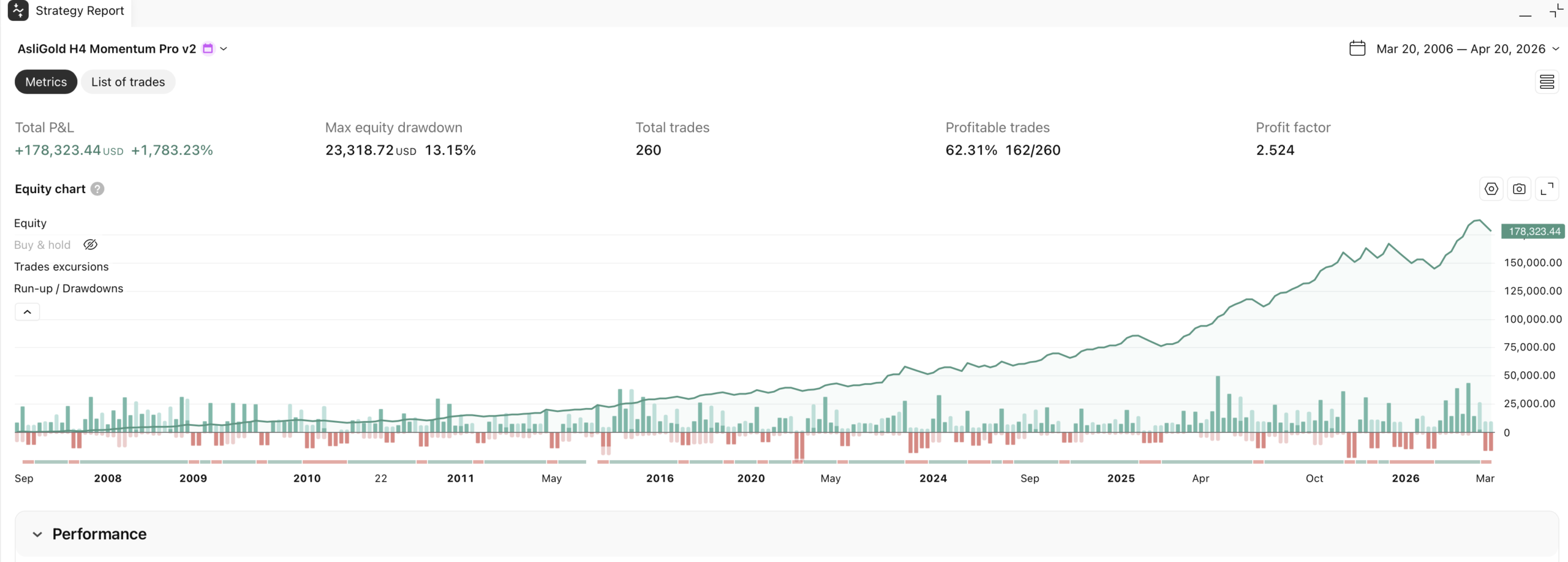
Strategy Tester output for H4 Momentum Pro v2 on XAUUSD. Run this on your broker’s data to validate the gold Keltner Channel breakout strategy before going live. Past performance does not guarantee future results.
11. FAQ: 6 Questions About Keltner Channel Breakout Trading on Gold
Bollinger Bands use standard deviation, which is heavily influenced by outlier bars. One spike candle distorts the entire calculation. Keltner Channels use ATR, which measures average range and is smoother. The upper band represents a more stable volatility boundary. When Gold breaks above it, the breakout is more likely to be genuine rather than a noise-driven spike.
The system only triggers on the bar where price first closes above the Keltner upper band. If price has been sitting above the band for several bars already, it doesn’t trigger again. This prevents entering extended moves where the breakout energy has already been spent. You want the initial burst, not the tail end.
The EMA regime gate shuts everything down. When EMA50 drops below EMA200 (or price drops below EMA50), the regime goes inactive. Zero entries. The dashboard shows “Regime: Inactive” and the green background tint disappears. This is the system protecting your capital during conditions where breakout buying is statistically a losing approach.
The Momentum Edge v9 uses a proprietary multi-bar momentum continuation model with three-layer protection and was tested across 28 strategy models. The H4 Momentum Pro uses a specific Keltner Channel breakout approach with EMA regime gating. They operate on the same timeframe (H4) but target different entry types: v9 catches momentum continuation, Momentum Pro catches fresh channel breakouts. Both can be run simultaneously on separate charts.
Signals are sparse by design. This is a bull-regime amplifier. During strong Gold uptrends, you might see 2-4 signals per month. During sideways or bearish markets, zero. If the dashboard says “Regime: Inactive,” there’s nothing to trade and that’s the system working correctly. Don’t force trades when the regime gate is off.
It shows how far the current price is from the Keltner upper band as a percentage. When it drops below 1%, a breakout attempt is imminent. Below 0.5%, the next strong bullish bar will likely trigger a signal. Use it for anticipation – prepare your position sizing before the signal fires, not after.
Read next
Gold Mean Reversion Indicator [H1] – Catch Tops and Bottoms
Gold 1-Minute Scalping Indicator – Precision Entries
Gold Momentum Edge v9 – H4/Daily Trend Following
Gold Pullback Trading Strategy – Buy Dips on H1
Asligold TradingView Indicators – Complete Toolkit
Gold Price Prediction – Weekly XAUUSD Analysis
Have a question about the indicator or membership?
Risk Disclaimer: Trading Gold (XAUUSD) and other financial instruments carries substantial risk. Past performance does not guarantee future results. The AsliGold H4 Momentum Pro v2 indicator and strategy are for educational and informational purposes only – not financial advice. Strategy Tester results are based on historical data. Always use proper position sizing and risk management. Never risk more than you can afford to lose. The final trading decision is always yours. This website contains affiliate links – see full disclaimer.